Why Your Business Needs Professional Email Hosting Services?


In today’s digital economy, email remains a critical pillar of communication—used daily for marketing, sales, customer service, collaboration, and data exchange.

Yet, many businesses still rely on free and unsecured email services that can expose them to spam, data loss, phishing attacks, and poor professional perception. As businesses grow, the need for secure, branded, and reliable email hosting becomes not just a technical upgrade, but a strategic move.

That’s where Albendigitech’s professional email hosting steps in.

1. Build Trust and Brand Credibility with Custom Email Hosting

Your email address is often the first impression your business makes.

Using a custom email like info@yourcompany.com instead of a generic Gmail or Yahoo address instantly boosts your credibility. Clients and partners are more likely to trust your communication, knowing it’s coming from an official domain tied directly to your company.

A domain-based email also improves your online visibility. Customers can search your domain, find your website, and engage with your brand more confidently—helping you drive more clicks, conversions, and customer loyalty.

💡 Did You Know?
 75% of customers say a branded email address increases their trust in a business. (Source: GoDaddy, 2023)

2. Improve Email Deliverability and Inbox Success Rate

Email marketing and customer communications only work if your emails actually reach the inbox—not the spam folder.

At Albendigitech, our email hosting infrastructure is designed to improve deliverability, with features such as:

✅ Validated Domain Setup

We configure your domain with proper SPF, DKIM, and DMARC settings to show email providers (like Gmail, Outlook, Yahoo) that your domain is verified and safe.

✅ Dedicated IP Addresses

Unlike shared IPs that may be blacklisted due to others’ behavior, we provide dedicated IPs for bulk email clients—ensuring your sender reputation remains clean.

✅ Less Spam Tagging

Free emails can easily be mistaken for phishing attempts. A branded domain with strong DNS and SSL security reduces the risk of being flagged as spam, ensuring better open and click-through rates.

📨 “Poor deliverability can silently kill your business communication. With Albendigitech, your emails go where they should—right into the inbox.”

3. Protect Sensitive Business Data with Enterprise-Level Security

Business email systems are among the most targeted platforms for cyberattacks. Albendigitech helps your business protect its digital communication through robust security features:

🔐 End-to-End Encryption

Your messages are encrypted during transmission, ensuring only you and your recipient can read them—even if intercepted.

🔐 Two-Factor Authentication (2FA)

Albendigitech supports advanced 2FA methods, including app-based codes and biometric verification (e.g. Face ID, Touch ID), to prevent unauthorized access.

🔐 Advanced Spam & Threat Filtering

Our filters block phishing links, malware attachments, and unsolicited bulk emails—keeping your team safe and focused.

🔐 Automatic Software Updates

Our email hosting platform is continuously updated with the latest security patches and performance enhancements, so you’re always protected from new threats.

4. Streamlined Collaboration with Scalable Email Hosting

Whether you’re a small startup or a large enterprise, Albendigitech provides scalable email solutions for your entire team. Add users, manage access, and sync emails across all your devices—mobile, desktop, and web.

  • Multi-user admin panels

  • Shared calendars and contacts

  • Centralized user management

  • Integration with ERP & CRM systems

5. Albendigitech: Your Email Hosting Partner in the Digital Era

Unlike global email platforms that offer limited support, Albendigitech is deeply rooted in local expertise et African business needs.

We don’t just host your email—we:

  • Design your website

  • Host your entire digital infrastructure

  • Manage your brand assets

  • Offer integrated ERP, eCommerce, and CRM tools

  • Provide localized support every step of the way


Email Hosting vs Free Email: What’s the Difference?

Feature Free Email (e.g. Gmail/Yahoo) Professional Email Hosting
Uses Business Domain ❌ No ✅ Yes
Spam & Virus Filtering Basic Advanced
Data Ownership Limited Full control
Storage Capacity Limited Scalable
Branding & Credibility Low High
Technical Support Minimal 24/7

8. Security, Reliability, and Uptime

At Albendigitech, we partner with leading data centers and implement:

  • SSL encryption

  • Two-factor authentication

  • Daily data backups

  • Spam and malware scanning

  • Redundant failover systems

Our hosting environment offers 99.99% uptime, so your email is always available when you need it most.


10 Simple Email Habits That Will Change How You Work

Email is a powerful tool—but if left unmanaged, it becomes a daily source of stress and distraction.

The good news? With a few simple habits, you can regain control of your inbox, stay focused, and get more meaningful work done.

Here’s a streamlined approach to email productivity:


🔟 Essential Email Habits

  1. Check email only 2–3 times a day. Don’t let it dictate your schedule. Process in batches.

  2. Process, don’t just read. Act, reply, archive—or add to a task list. Don’t leave emails lingering.

  3. Add events to your calendar instantly. If a date is mentioned, schedule it immediately.

  4. Use keyboard shortcuts. In Gmail, shortcuts like a (archive) and r (reply) save time.

  5. Keep replies short. Aim for 1–3 sentences. Longer thoughts? Use a shared doc.

  6. Use a real task manager. Don’t let your inbox double as your to-do list.

  7. Inbox = Unread only. Only unread emails stay in view. Read = archived.

  8. Save articles for later. Don’t get sidetracked. Use Instapaper or bookmarks.

  9. Unsubscribe and filter aggressively. Guard your inbox like your front door.

  10. Close email when done. Keep it out of sight to stay focused.

Why It Matters

When your inbox is under control, your mind is clearer. You’ll work more intentionally, avoid digital burnout, and free yourself to focus on what matters most.

References:

  1. Zen Habits – “My 10 Essential Email Habits” by Leo Babauta
     A classic article outlining minimalist yet powerful email habits, such as processing emails in batches, using shortcuts, and focusing on action over clutter.
     🔗 Read on Zen Habits

  2. Medium – “From Inbox 547 to Inbox 10: Building Healthy Email Habits” by Lindsay Bayuk
     A relatable and practical take on taming a chaotic inbox using real-life strategies, ideal for professionals overwhelmed by email overload.
     🔗
    Read on Medium
  3. LinkedIn – “11 Good Email Habits for Productivity” by Nykea Marie Behiel
     A concise breakdown of email do’s and don’ts that improve focus, reduce stress, and foster intentional communication.
     🔗
    Read on LinkedIn
  4. Productive Blogging – “10 Good Email Habits for Greater Productivity”
     Offers tips specifically for business owners and bloggers, including treating your inbox like a workspace—not a distraction zone.
     
    🔗 Read on Productive Blogging
https://www.erp-information.com/wp-content/uploads/2021/01/History-of-ERP-1024x861-1.png

What is Enterprise Resource Planning (ERP)?

Are you still relying on spreadsheets, printed forms, and disconnected tools to run your business operations? Picture a typical workday.   The finance department is chasing missing invoices. Sales is waiting on inventory updates. The warehouse team isn’t sure what’s been shipped and what hasn’t. Meanwhile, customer service is fielding calls about delayed orders—and HR is buried in paperwork trying to calculate leave balances and salaries.   Each department is working hard. But they’re working in isolation. Key information is stored in multiple places—files, emails, spreadsheets, or worse, physical notebooks. Data has to be copied, checked, and re-entered repeatedly. Simple decisions take hours. And when mistakes happen, it’s difficult to trace where things went wrong.   This is the daily reality for many growing businesses:  
  • Systems don’t talk to each other.
  • Information is scattered.
  • People are overworked.
  • Customers are left waiting.
It’s not for lack of effort—it’s the lack of integration.   As businesses grow, the cracks widen. Manual processes that once worked become bottlenecks. Time is lost. Productivity drops. And opportunities slip through the cracks—not because the demand isn’t there, but because the operation can’t keep up.   This is where Enterprise Resource Planning (ERP) enters the picture. ERP refers to a software system that integrates all core business functions—finance, HR, procurement, manufacturing, inventory, and sales—into a single, unified platform. It doesn’t just collect data. It connects it.   But ERP is more than a tool—it’s a turning point. Before diving into the possibilities it offers, it’s worth understanding how it evolved—and why it’s now a cornerstone of modern business infrastructure.

What Is ERP?

Enterprise Resource Planning (ERP) refers to a category of software systems that help businesses manage and integrate their core activities—finance, HR, procurement, manufacturing, inventory, logistics, customer relationships, and more—into a unified digital environment.

Rather than juggling multiple applications, ERP creates a central system that allows departments to share information, automate tasks, and operate with real-time visibility.

Selon Microsoft Dynamics 365, ERP is designed to “improve productivity and decision-making by integrating financial, operational, and human resources data into one source of truth.

Oracle, another global leader in ERP, defines it as “a suite of integrated applications to streamline and automate core business processes” (Oracle ERP Cloud).

SAP, widely used by large enterprises, states that “ERP is the digital core of modern businesses, enabling them to operate more efficiently in an increasingly digital economy.” (SAP.com)

For growing and mid-sized businesses, Odoo—a modern, open-source ERP platform—offers a modular and affordable approach to the same integration, especially with the help of local partners like Albendigitech.


ERP, or Enterprise Resource Planning, is a business management system that brings all departments—sales, finance, inventory, HR, marketing, procurement—into one unified platform.


Think of ERP as the operating system of your business: everything works faster, smoother, and with less error. No more jumping between tools or struggling with disconnected data.

With ERP, your accounting talks to your inventory, your sales team sees what’s in stock, and your managers can make better decisions—fast.


“The goal is to turn data into information, and information into insight.”

— Carly Fiorina, Former CEO of Hewlett-Packard


The Journey of ERP

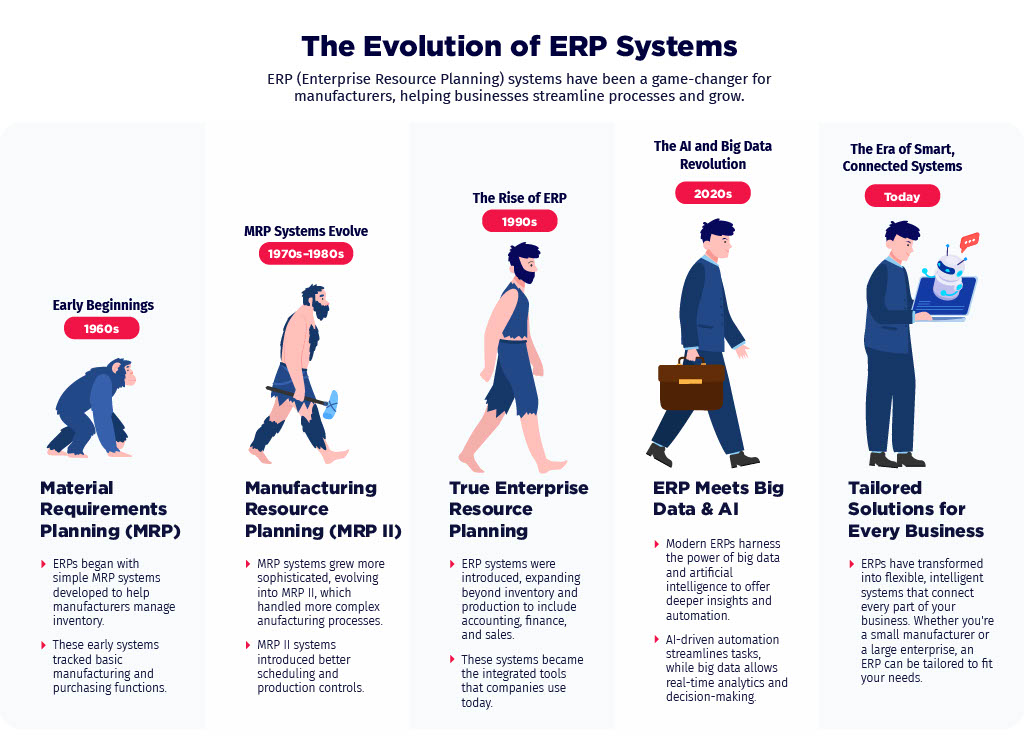
ERP’s story goes back over 100 years. In its earliest form, it was just a paper-based system for scheduling production in factories.

➤ 1960s

Computers entered the scene. Manufacturing companies started using software to manage production schedules and materials—what we now call MRP (Material Requirements Planning).

➤ 1990s

The software evolved. MRP turned into full-blown ERP, linking not just production but finance, HR, supply chains, and more. Businesses across industries began adopting it.

➤ 2000s to Present

Cloud technology changed everything. With faster internet and browser-based access, Cloud ERP became affordable and scalable—perfect for small and mid-sized businesses.

Today, ERP systems are intelligent—they use AI, machine learning, natural language processing, and real-time analytics to help you make smarter decisions, faster.

https://www.erp-information.com/wp-content/uploads/2021/01/History-of-ERP-1024x861-1.png

https://www.geniuserp.com/wp-content/uploads/2024/02/1732048739240-7e12b159-df32-4396-a0db-84495f271176_1.jpg

 Why ERP Is a Game-Changer for Modern Businesses


In today’s fast-moving markets, having disconnected tools and manual processes is a recipe for delays, mistakes, and missed opportunities.


Here’s why ERP is critical for any growing business:


Department

ERP Value

Finance

Automates accounting, speeds up financial closing, ensures accuracy.

Ventes

Manages customer orders, tracks leads, and shortens sales cycles.

Logistics

Ensures timely deliveries, accurate inventory, and customer satisfaction.

Procurement

Simplifies purchasing, manages vendors, controls spending.

HR

Centralizes employee data, tracks attendance, and handles payroll.

Management

Provides real-time dashboards and performance insights.

📊 A “Single Source of Truth”

ERP brings all your data into one place, so you avoid duplicate entries, delays, and miscommunication. Whether you’re a shop, an eCommerce brand, or a logistics company, ERP gives you clarity and control.


Albendigitech ERP in Partnership with Odoo


We at Albendigitech are proud to offer ERP services in partnership with Odoo, one of the world’s leading open-source ERP platforms. With over 7 million users globally, Odoo delivers enterprise-grade tools—yet it’s accessible and cost-effective for businesses in Benin and West Africa.


This partnership allows us to bring:

 
  • Local support with global tools

  • Customization that fits your market

  • Affordable pricing with scalable features

Whether you’re just starting or already scaling, our ERP solutions grow with your business.


Key Odoo Applications We Offer


With Odoo’s modular design, you only pay for what you need. Here are some core apps we provide and implement for our clients:

🧾 Sales & CRM

  • Lead tracking, quotation creation, automated follow-ups.

📦 Inventory & Warehouse

  • Smart stock levels, warehouse mapping, real-time tracking.

💰 Accounting & Invoicing

  • Auto-reconciliation, multi-currency support, tax compliance.

🛒 eCommerce & POS

  • Online store integration, payment gateways, barcode scanning.

👨‍👩‍👧 Ressources humaines

  • Attendance, payroll, leave management.

📣 Marketing Automation

  • Campaigns, email newsletters, social media scheduling.

All apps talk to each other in real-time. For example, a sale automatically adjusts stock and creates an invoice—no double entry, no delays.


Real Benefits You Can Expect


ERP is not just a tool—it’s a performance booster. Here’s what businesses have experienced globally:


Benefit

Result

📈 Operational Efficiency

23% increase in productivity through better workflows.

🛍 Customer Satisfaction

25% rise due to faster service and clear communication.

💵 Cost Reduction

20% drop in inventory costs from smarter tracking.

⏱ Decision-Making Speed

18% faster due to real-time dashboards and reporting.

🔄 Data Accuracy

30% improvement—no more guessing or spreadsheet errors.

And most important?

Companies that implement ERP report an average ROI of 52%—that means for every $1 you spend, you make $1.52 back in value. (SoftwareSuggest, 2023)


❓ Frequently Asked Questions (FAQ)

1. What does ERP actually do?

ERP connects different parts of your business—finance, HR, inventory, sales, procurement—so that data flows seamlessly, tasks are automated, and reports are generated in real-time.

2. Is ERP only for large companies?

No. Modern ERP solutions (like Odoo) are designed to scale with your business. Whether you’re a startup or a mid-sized operation, ERP can be customized to your size and industry.

3. How is ERP different from regular software?

Unlike standalone apps (e.g., accounting or inventory software), ERP combines multiple tools into one unified system—eliminating the need to switch platforms or duplicate entries.

4. Is cloud-based ERP safe?

Yes. Leading ERP vendors like Microsoft, Oracle, SAP, and Odoo offer enterprise-grade security, encryption, and data protection for cloud ERP platforms.

5. How long does ERP implementation take?

This depends on the size and complexity of your business. Small implementations can take a few weeks, while larger ones may take months. A partner like Albendigitech helps simplify and speed up the process.

Table of content

12 Email Habits for Maximum Productivity

Effective email management is crucial for maintaining productivity and reducing stress. Here are some habits to help you manage your inbox efficiently:

1. Set Specific Times for Checking Email

  • Avoid Constant Checking: Limit email checks to specific times (e.g., morning, after lunch, and before leaving work). This prevents distractions and helps you focus on other tasks.
  • Turn Off Notifications: Disable email notifications to avoid interruptions.

2. Use the Two-Minute Rule

  • Quick Responses: If an email can be addressed in two minutes or less, respond immediately. This prevents small tasks from piling up.

3. Prioritise with the 4D Method

  • Delete: Remove irrelevant or unnecessary emails.
  • Delegate: Forward emails that someone else can handle.
  • Defer: Set aside emails that require more time or attention for later.
  • Do: Respond to or act on emails that are urgent or important.

4. Organise with Folders and Labels

  • Create Folders/Labels: Organise emails by project, client, or priority level to make them easier to find.
  • Use Filters: Automatically sort incoming emails into folders or labels based on sender, subject, or keywords.

5. Unsubscribe Ruthlessly

  • Reduce Clutter: Unsubscribe from newsletters, promotions, or updates you no longer read. Tools like Unroll.me can help streamline this process.

6. Use Templates for Common Responses

  • Save Time: Create templates for frequently sent emails (e.g., meeting requests, status updates) to avoid rewriting the same content.

7. Keep Your Inbox Clean

  • Inbox Zero: Aim to keep your inbox empty or near-empty by archiving or deleting emails once they’re addressed.
  • Archive Regularly: Move completed or non-urgent emails to an archive folder to keep your inbox clutter-free.

8. Set Clear Expectations

  • Use Out-of-Office Replies: When unavailable, set an out-of-office message to manage expectations and reduce the pressure to respond immediately.
  • Communicate Response Times: Let people know your typical response time to avoid unnecessary follow-ups.

9. Leverage Email Tools and Features

  • Snooze Emails: Use the snooze feature to temporarily remove emails from your inbox and have them reappear at a more convenient time.
  • Schedule Emails: Send emails at optimal times using scheduling features.
  • Use Search Effectively: Master your email platform’s search function to quickly locate specific emails.

10. Review and Reflect Weekly

  • Audit Your Inbox: At the end of each week, review your email habits and organisation system. Adjust as needed to improve efficiency.
  • Plan Ahead: Use insights from your review to plan for the upcoming week.

11. Avoid Over-CCing

  • Be Selective: Only include necessary recipients in emails to reduce unnecessary replies and clutter in others’ inboxes.

12. Use a Task Management System

  • Integrate with Tasks: If an email requires follow-up, add it to your task management system (e.g., Todoist, Trello, or Asana) instead of letting it linger in your inbox.

By implementing these habits, you can streamline your email management, reduce stress, and focus on high-priority tasks, ultimately boosting your productivity.